Media and New Technology Customized Search

Friday, May 16

Making money using Amazon.com

I previously spoke about how you could make money using AdSense... Here is Another way that helps bloggers to make money:


http://www.amazon.com/: It is an affiliate program that allows your blog to connect readers and online sites that offers benefits together. You just have to mention the name of a certain book in your blog, and this program enables your visitor to click from your own blog to Amazon to develop their information about this book. And you get paid if the readers break out the checkbook or charge card. Moreover you can market your services in your blog. Instead of writing a diary that deals with your quotidian experiences, you can generate business, by publishing a post about your certificates, majors, skills and experiences. And in return, other bloggers may offer career to the visitors of their blogs by mentioning the requirements and obligations. Or you can simply take the advantage and advertise through your blog for your business, by informing customers and readers about every single thing your business does, Such as sales, product's quality, services, and special offers. This may expand your visitor's appreciation to your productions.


Posted by: Ghyna Kurdy

Thursday, May 15

How to delete your files permanently

I previously spoke about how you can restore files from your computer (restore your deleted files). In this post i will explain how you can delete your files ENTIRELY from your computer, that no one can restore it again (There will always be a way to restore files no matter how much and how it has been deleted, but using this method wont allow any average 'deleted file restoring' software, but will need a more high-tech software to do the trick against this technology of deleting files).

Again, as i always say, there are many programs that you could use to delete files entirely from your PC, you can simply go to Google search and search for free programs that could delete your files completely or just click on this hyperlink: "delete files completely free". Or you can find a list of programs with images, descriptions and prices on this link: http://delete-file.safe-install.com/, or free programs on this site: http://www.freedownloadmanager.org/downloads/file_deletion_software/.


I will talk about "AEVITA Wipe & Delete" program. As they say on their website: "AEVITA Wipe & Delete is a reliable and ultra-fast shredder that will help you securely erase any file or folder without any chances for its recovery". I don't know if this is 100% true because of the fact that i know that there is always a way, but till now, this program has served me pretty well.


Now i will explain in 5 easy steps how you can delete your files entirely (or almost entirely) from your computer:-


  1. Download AEVITA Wipe & Delete (1.3 Mbs).


  2. Install AEVITA on your computer (Just follow the steps after you double-click on the downloaded folder, the downloaded program or the installer has an icon of a red X).


  3. Once you open the AEVITA program, a welcome window will ask you weather you want to delete files using wiping or wipe free space. Select 'delete files and folders using wiping' and click next.


  4. Then click on "Add Files" or "Add Folders", then select them so that they are shown in the middle as shown below. After you selected all the files and/or folders you want to permanently delete, click next.


  5. A warning sign will then appear asking you if you want to permanently delete this file/folder foe sure. WARNING: Be careful. after you delete your files using wiping, it will be somehow impossible to restore these files, so select them with extreme caution.


Posted by: Mayez Kabbara.

Wednesday, May 14

BlogAd

What is a BlogAd?


Blogad is an online ad network, found in August 2002, based in West carolina that provides advertising services to both bloggers and advertisers in general. It attaches bloggers with promoters and imposes a commission in return for any ad placement that results. "The nice thing, too, is that the Ads are relatively unobtrusive," says Scott Allen, co-author of "The Virtual Handshake: Opening Doors and Closing Deals Online."


To know more about blogAds; how to make and how to subscribe to go to http://www.blogad.com/. You can create an account and learn more about BlogAds there.


Posted by: Ghyna kurdy

Monday, May 12

Apple: Time Capsules!


January 15, 2008 (Macworld) -- Apple Inc. today unveiled Time Capsule, a new product designed as companion hardware to the Time Machine automatic backup feature in OS X 10.5.
Introduced as part of the OS X Leopard upgrade last October, Time Machine automatically backs up the contents of a Mac to an external hard drive.
Time Capsule combines an 802.11n network access point and a hard disk drive. The device is a "full AirPort Extreme base station" -- it bears an uncanny resemblance to Apple's wireless base station -- combined with "a server-grade hard drive," according to Apple CEO Steve Jobs.


Time Capsules we all are familiar with what they are and what they do. It sends things to the future by storaing it all the time before, as if it is sent in a time machine. Apple, has created us time capsules that we can always benifit from. For you can store files in a time calpsule then throgh time, get any info you need from it, from the backed-up files of the time capsules (Data, photo, video, multimedias, etc...) wirelessly.


Time Capsule features dual-band antennas for 2.4 GHz or 5 GHz frequencies. It has one USB 2.0, Gigabit Ethernet and 3Gbit/sec. LAN ports. The device also has a built-in power supply and can connect to print wirelessly from a USB printer, according to Apple. In addition, Time Machine offers Wi-Fi Protected Access (WPA/WPA-2), 128-bit WEP encryption, and a built-in NAAT firewall that support NAT-PMP for Leopard's Back to My Mac feature.
Time Capsule ships in February in two capacities: a 500GB model for $299, and a 1TB version for $499. Info gotten from: http://www.computerworld.com/action/article.do?command=viewArticleBasic&articleId=9057320
Time capsules can be very handy and it is making the Apple company such a great success, which is making them ask for more.


Done By: Mayez Kabbara


layouts features

How can I use the Blogger Layouts features?


1- Go to the dashboard, and click on the template button.


If this link says Layout instead, then it's already upgraded and you can skip the rest of these steps.


2- On the Template page, search for the navigation link in the tab that says customize your design and click on it.


3- Then you will get a message explaining that Blogger will make a backing of your recent template and change it to an upgraded one. Click on the Upgrade Your Template button.


4-select your default template designs. Click Save Template when you've made your choice.


You'll end up on the new Page Elements tab, where you can start arranging things however you like.

You can easily edit and customize the colors, fonts, header and sidebar of your blog with Blogger's Layout feature. To customize your blog's layout, go to the Layout Page Elements tab in blogger.


How to arrange elements in your template?

Arrange the elements in your template as you want. You just have to click on the element that you like to move and "drag and drop" it where you want it to be. You can move your page elements to the bottom of the page, anywhere in your sidebar, or below or above your blog posts. (Note: you can move all elements except your navbar, blog posts and header in some templates.)


Editing elements in your template

Navbar: choose the color you want for your navbar.

Header: add your blog header that includes the title and description of your blog.

Blog posts: you have two options; you can choose either the number of days with posts to display or the total number of posts on the main page. You also have the choice to show email post links that let your visitors easily email posts from your blog to their friends.

Profile: add the title of your profile, 'About Me' description, and location.

Blog archive: Edit/add your blog archive title, choose your display style, choose to display post titles, display oldest posts first, choose your archive frequency (monthly, weekly or daily) and date format.

How to add a page element?

You can add several page elements to your blog page or sidebar by clicking Add a Page Element.
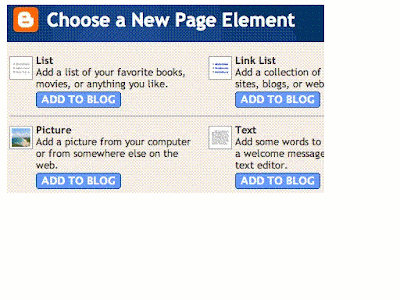
List: Add a list with the ability to add a title, select the number of items to display, sort your list alphabetically and add links to your list elements.

Link List: Add a link list to your blog with the ability to add a link list title, select the number of items to display and sort your link list alphabetically.

Labels: Add a list of all the labels you've used on your posts. Click each link to see a page showing all the posts with that label. You can change the title of the list, and sort it alphabetically or by frequency of use.

Picture: Add a picture from your computer or the web. You can also add a title and caption to your picture and shrink the picture to fit into your blog perfectly.

Text: Add text to your blog (such as a welcome message or footnote) with our rich text editor.

HTML/JavaScript: Add third-party functionality or other HTML/JavaScript code to your blog.

Feed: Add content from a site feed. Enter the feed URL, then click Continue. You'll then be able to add a title, select the number of items to show (up to five) and display the item dates and/or authors by selecting the appropriate check boxes.

Logo: Add one of our stylish Blogger logos to your blog.

Sunday, May 11

Online Storing


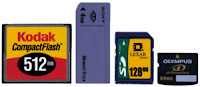
There are many ways to store files. There are the most familiar and used ways to us, which are by simply storing our files on our computer's or external hard-disk -- optical disk (CD, DVD, BD, etc...) -- flash disks (USB, Card disks) -- there was by using also floppy-disks, but thats gone now. Video and music tapes are also ways to store media files.


Life is evolving, technology is developing, new and improved ways of everything are coming to notice. The most advanced and efficient way of storing today is by storing data online.


Benifits of storing online:-


Storing online could be very useful. You could:-
  1. Store normally your files like what i do on http://www.mediafire.com/.
  2. Use this new technology to your benifit by backing-up your current files from your pc.
  3. Sharing files online.

To know more about sites that provide internet storage space, click here.
To watch a YouTube video explaining online storage, click here.
To know more about types of flash disks, click here.

Posted by: Mayez Kabbara


Friday, May 9

Make money using your Blog: AdSense

If your blog is famous and well-known; the usual way that bloggers use to make incomes is to advertise ad space on their own. But if yours is NOT known, free services such as Google's AdSense, enables bloggers to establish ad programs. AdSense allows you to go for several ads that are connected with the specific theme of your blog. You earn money in proportion to how many times the readers click on your ads for additional knowledge. The things that make blogging such an essential opportunity for groups who want to get incomes from AdSense, is that Google supports blogs because most of them focus on a particular issue. In addition companies encourage this because they like the fact that pages modify regularly, And of course because a good blog gets fans and visitors. All of that means excellent search engine rankings, well contextualized ads and plenty of good revenue.


How to subscribe to AdSense?

First step is to open the Layout in your Settings. Then add a Page Element, select the AdSense element from the new opened window. Then select the colors and look of the Ad. An email will then be sent to you explaining the next steps.


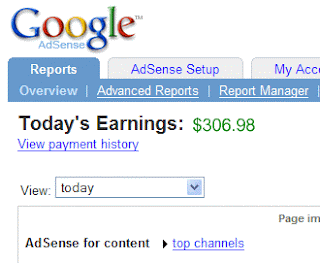
Then after ending all the procedures. You will end up with extra cash in your bank account. Just like the guy bellow.


Posted by: Ghyna Kurdy

Thursday, May 8

Cookies!

What are Web Cookies?!


Sometimes refered to as tracking cookies. It is just texts that are sent from any web site you visit to your PC. Its a link between ones server and web client. The word cookie is derived from the word "Magic Cookie" which is a well known concept of UNIX which inspired also the name of HTTP Cookies.


Cookies have been concern of internet privacy. Some feer it could allow unwanted actions, such as recieving viruses and such.

Cookies purpose is to maintain data related to the user while navigating through the web. Its almost like a automatic Tivo program.

Posted by: Mayez Kabbara

Editing your Posts

Hello new blog users :)

This post will hopefully help in making you organize your post easier and faster.

To most of you, you might have probably know by now how to create posts and editing them. But Blogger.com carries you much more options that could help you with your work and projects:


  1. Save your posts as draft: You can simply save your posts as draft by clicking the "SAVE NOW" in blue right next to the orange "PUBLISH POST" button.
    This will come in handy in case you didn't have time to finish writing your post and you wish to continue it later without putting the post on your blog.


  2. Schedule your posts to get published in a selected date: A recent feature by blogger. If you ever wrote a post that you don't wish to get published yet, and you know that you might have a difficulty to publish it on the day you wish to (because you cant have Internet access on that date or for whatever other reason). You could now schedule your posts in prior to appear on your post later.
    All you have to do is to click on the "Post Option" on the down-left side of your post-editor page. Then change the "Post date and time" on the right hand-side to a future date that you wish it to get published.

  3. To see and organize your drafts and scheduled posts. Go to "Edit Posts" in the "Posting" section of your "Settings". Then on the right-upper side, you can either click on


  • All: Which allows you to see ALL your posts (Published, drafts, and scheduled).
  • Drafts: To view and edit your drafts posts.
  • Scheduled: To view and edit your scheduled posts.
  • Published: To view and edit all your published posts.

Posted by: Ghyna Kurdy

Monday, May 5

Restore your deleted files!

Did you know that you can restore a deleted file?! I dont mean restore from the recycle bin, but i mean files that you thought have been permanantly deleted. Many might know that, but to those that dont, let me explain again. If you deleted a file by mistake, or deleted a file that you thought wasn't important but turned out that you need to use it again, then you can restore, or get that file again even after it has been deleted. How? There are many softwares that you could use -- Here is a list some of the most famous softwares or programs that you could get to restore your deleted files:-


...And many other more...


However you have to pay for these softwares. If you would like a FREE way, you could visit this 5 stars rated article, with just 4 easy steps that stands between you and any of your deleted files ---> http://www.ehow.com/how_2263300_files-windows-pc-free-software.html, or simply just download the file "Undelete Plus v2.94" on the URL: http://undelete-plus.com/download.html.
More explanation and another freeware software could be found on this site: http://www.aumha.org/a/recover.php

Hope that this post was helpful to most of you, because i believe that knowing this information is very relevant.

Post by: Mayez Kabbara.